

An effective audit tool does more than store uploads: it must make it possible to reconstruct why a control passed, why a finding was raised, and which specific evidence supports a remediation and its verification. A folder full of attachments is not enough — the relationships between control, test, workpaper, evidence, reviewer assessment and corrective action must be explicit and traceable.
This article focuses on internal controls and compliance testing. It outlines an operational approach to document tests and findings so another reviewer can re‑establish the trail without asking the original author for clarifications. It does not cover statutory financial audit procedures or provide legal advice.
What an audit platform should link together
The path to reconstruct is straightforward: control → test → workpaper → finding (if any) → remediation → final verification. Each step must reference the prior step, even when attachments change or different people participate.
Define roles for the key documents:
- Workpaper: describes the activity performed and supports the conclusion.
- Evidence: the documents, records or system extracts inspected.
- Finding: a formal statement of deviation from a stated criterion.
- Remediation: the corrective action taken to address the finding.
- Re‑review: verification that the remediation achieved the intended effect.
Without these distinctions, it’s easy to mistake the mere upload of a file for proof that a control is effective. Files can be incomplete, from the wrong period, or insufficient to support a conclusion.
Calendar scheduling and task assignment are useful, but the most important capability is that a second reviewer can read the file package and understand what was done and why.
Workpapers: document the test, not only the attachment
Before collecting files, be clear about the objective. “Check access rights” is too vague. A precise test might be: “Verify that privileged accounts terminated during the review period had their access revoked per the organisation’s access control procedure.” That formulation makes population, sample and acceptance criteria explicit.
A workpaper in the audit tool should make at least the following elements readable:
- Identifier and control reference: a unique workpaper code and the control it maps to, to avoid ambiguous links.
- Objective and acceptance criteria: the test question and the rule used to judge results, so the conclusion is meaningful.
- Scope and period: systems, processes and timeframe covered.
- Population and sample: source data, selection method and rationale for the sample size.
- Procedure performed: the steps actually carried out (what was done vs. what was planned).
- Evidence and results: precise references to documents and the exceptions found.
- Author and review: who performed the test, who reviewed it and when.
If you extract 80 rows and test 10, record how those 10 were selected and why. Don’t automatically project the sample outcome to the full population without documenting the sampling logic.
Also record limitations: unavailable data, excluded systems or checks that couldn’t be repeated. A narrowly scoped conclusion with supporting evidence is more valuable than a blanket “compliant” statement without context.
Turning a test result into an actionable finding
A finding should separate observation from interpretation. “Inadequate access management” is not actionable. A verifiable finding states the criterion, the observed deviation, the supporting evidence and the related risk.
Example: “For two accounts in the sample there is no documented record of the periodic review required by the access control procedure.” This identifies a documentation gap; it does not, by itself, prove that the reviews never occurred or that the accounts were misused.
The audit system must keep that distinction and link each finding to the originating workpaper and the specific exceptions. If new information appears, the re‑review should explain how the assessment changes without erasing the original trail.
Separate operational ownership from validation
Assign an owner for remediation, a justified deadline and a clear acceptance criterion. Also identify who will evaluate the final evidence — this can be different from the person implementing the fix.
Record causes only when there is enough evidence; otherwise label them as hypotheses. For example, “lack of integration between HR and IT” requires corroboration and should not be treated as the automatic explanation for every delayed revocation.
If the remediation owner disputes a finding, preserve their response and the reviewer’s decision. A dispute is part of the audit record, not a reason to erase the original observation.
Practical example: auditing a vendor access pool
Imagine an audit of technical access granted to a connectivity vendor. The population contains 24 accounts and the auditor samples six accounts, recording the selection rationale.
Contextual marketing or public pages about the vendor can help describe the service, but they do not demonstrate which customer accounts exist or whether internal controls were applied. Useful evidence includes account lists, authorization records, assigned roles, confirmation from the internal owner and logs or records of revocation.
If an account lacks a documented authorization, link that exception to the sampled account in the workpaper — not just to a generic file named “vendor access.”
The finding should state the missing evidentiary item required by the procedure. The remediation might be to validate the need for the account and either formalise the authorization or revoke the account. Fixing one account does not necessarily prove the approval process is robust; the re‑review should therefore test both the specific account and whether process changes were applied retroactively.
Note: granting an authorization today does not prove it existed during the audit period; keep those events distinct.
Closing a finding requires verification, not just a status change
“Activity completed” and “finding closed” are not the same. The remediation owner may have updated a procedure, reconfigured a control or revoked an account, but the auditor must still assess whether the submitted evidence meets the agreed acceptance criteria.
A practical workflow separates: remediation in progress → evidence submitted → re‑review performed → final decision. You don’t need excessive status codes, but it must be clear who should act next and what remains outstanding.
When closing a finding, require a verifiable rationale: evidence examined, tests repeated when necessary, results and the reviewer who validated the outcome. A mere confirmation from the remediation owner is not sufficient to demonstrate effectiveness.
Also separate remediation from risk acceptance. If the organisation decides not to remediate immediately, record the authorised decision, the approver, the rationale and the next review date. Do not present a documented acceptance as remediation completed.
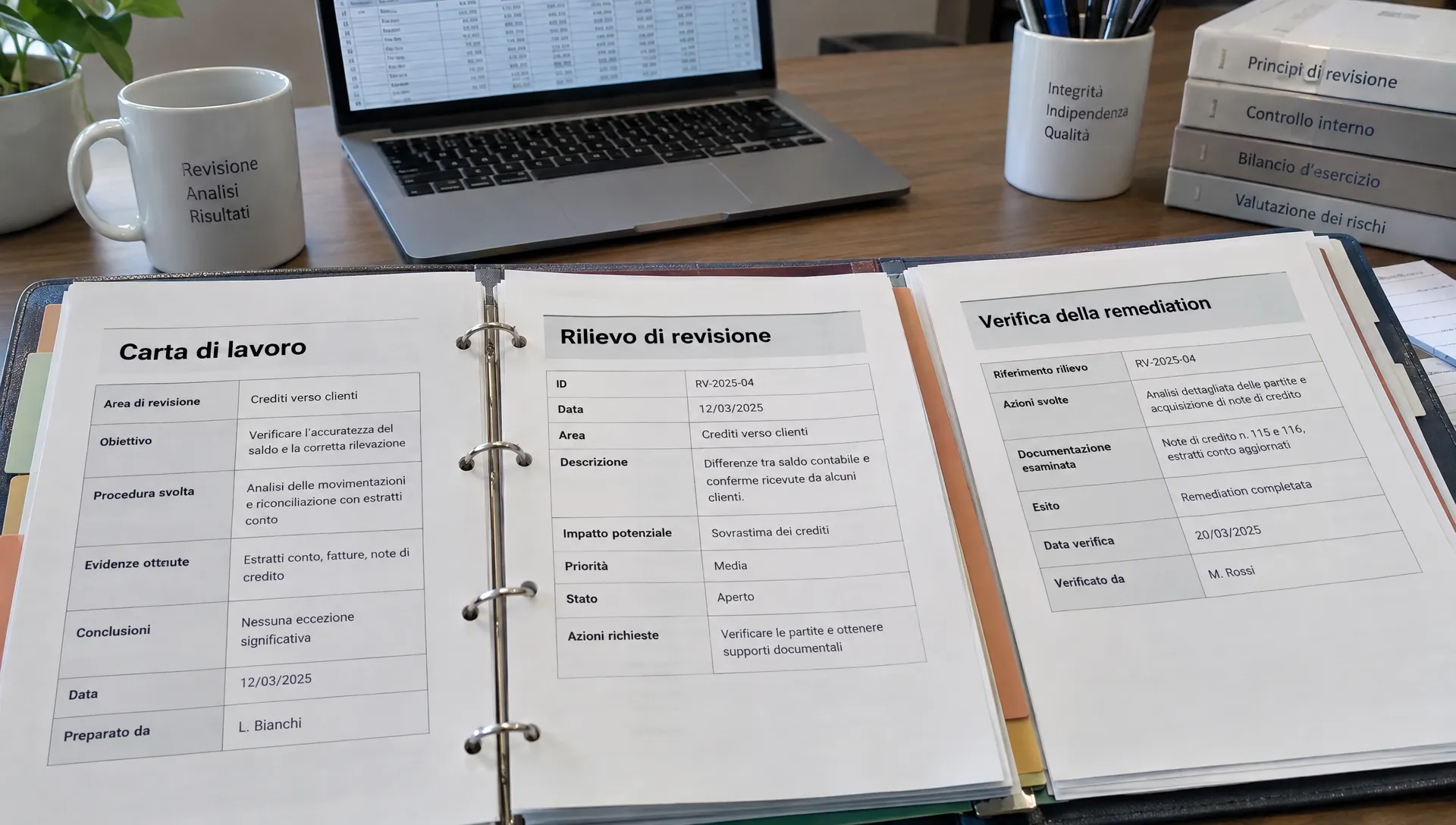
How to evaluate a platform: use a complete scenario
During vendor selection, avoid demos that only show bulk uploads. Prepare an anonymised scenario that includes a test, an exception, an owner’s rebuttal and a subsequent remediation.
Ask the vendor to reconstruct the full trace up to the final review, then verify these aspects:
- Linkability: can the final conclusion be traced back to the tested workpaper and the specific evidence examined?
- Accountability: are the actors who executed, remediated and validated visible according to the organisation’s rules?
- Change history: are edits to the workpaper transparent and explained?
- Exportability: does an exported package preserve identifiers, references and enough context for an independent reviewer to follow the trail?
The decisive proof is to hand the exported package to a person who did not participate in the engagement. If they need to ask which file was used or why the finding is closed, the export is not self‑sufficient.
Choose software based on its ability to support that reconstruction, not on the number of screenshots. Clarify which features are available out of the box, which require configuration, and what remains a team responsibility. No tool can compensate for a poorly designed test.
Workpapers that contain personal data: limit exposure and keep relevant proof
Evidence often contains names, user IDs or employee data. The audit dossier should not become an uncontrolled copy of operational systems.
GDPR principles such as data minimisation and storage limitation apply where relevant: collect only data necessary to support the conclusion and, where possible, use identifiers or relevant extracts while keeping full records accessible only in a controlled environment. Define retention periods and ownership in line with your legal and risk framework rather than applying a one‑size‑fits‑all retention.
For more on GDPR and demonstrable compliance, see our deeper guide on the GDPR audit use case at /en/blog/gdpr-audit-demonstrable-compliance. In this article the practical control is simple: make sure workpapers, attachments and exports contain sufficient context for re‑review without spreading unnecessary personal data.
Frequently asked questions
Q: Is a workpaper the same as an evidence item? A: No. Evidence is what you inspect; the workpaper documents the objective, procedure, results and conclusion and links to the evidence. A good workpaper references the supporting files but does not substitute for them.
Q: Does issuing a new procedure close a finding? A: Only if the acceptance criteria are met. If the finding concerns operational execution, you must also verify that the procedure was applied in practice. Approving a document alone does not prove operational effectiveness.
Q: Can spreadsheets or shared folders replace audit software? A: For small, simple scopes they can suffice if the team reliably maintains links, responsibilities and review trails. As findings and remediation scale up, assess whether the method enables an independent reconstruction without fragile manual steps.
Q: What should be included in the final package? A: Reviewed workpapers, the pertinent evidence, findings and remediation decisions. Include documented limitations and an index so an external reader can map identifiers to references.
Evaluate the workflow with AuditReady
AuditReady centralises evidence with ownership, versioning and audit trail, tracks findings and remediation, and supports exports for auditors and stakeholders. These capabilities should be evaluated against the actual documentation tasks your team must perform — don’t assume automated approvals or automatic closures.
For a hands‑on assessment, try the AuditReady GDPR use case at /auditready/lp/gdpr with an anonymised test, the related finding and the remediation evidence.
The bottom line: a different reviewer must be able to reconstruct facts, assessments and decisions without relying on the memory of the person who did the work.
audit-ready evidence pack demo / not legal advice